Furnace Filter & Status-LED Monitor
Contents
The problem
Furnace filters get replaced on a calendar, or whenever someone remembers. Neither has much to do with how dirty the filter actually is. The furnace’s own diagnostics aren’t much better: a Carrier control board blinks an LED to report fault codes, but that’s only useful if someone is standing in the basement watching it at the moment it blinks.
The solution
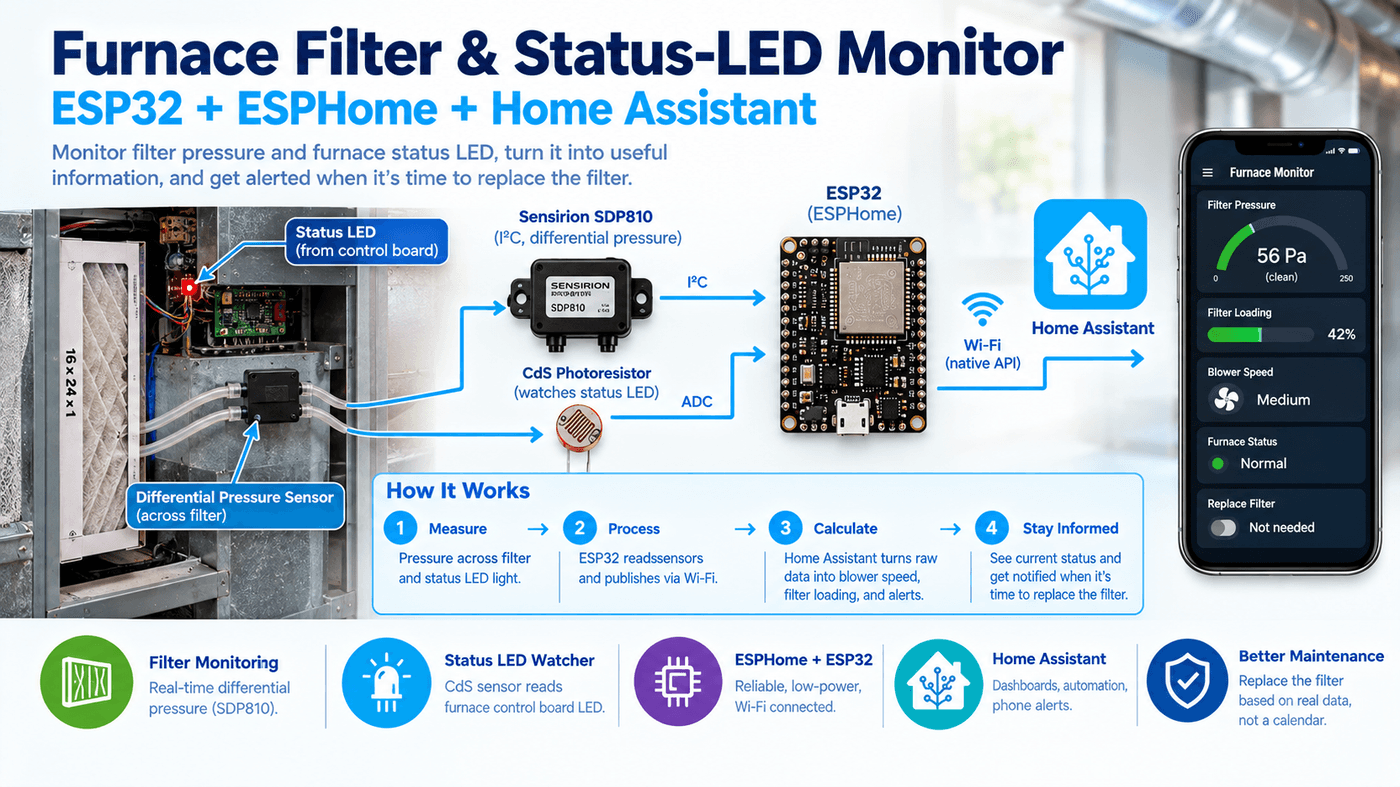
One ESP32 in the furnace room reads differential pressure across the filter and watches the control board’s status LED. Home Assistant turns the pressure reading into blower speed, a per-speed filter-loading percentage, and a phone alert, calibrated against a real baseline instead of a generic “replace every 90 days” rule. The LED watcher is built and reporting, but decoding its blink pattern into an actual fault code isn’t done yet (see Not done yet).
Architecture
flowchart LR
    A["Sensirion SDP810-500Pa\n(differential pressure, I²C)"] -->|every 2s| C["ESP32\n(ESPHome)"]
    B["CdS photoresistor\n(status-LED watcher, ADC)"] -->|every 50ms| C
    C -->|Wi-Fi, native API| D["Home Assistant"]
    E["T6 Pro thermostat\n(HomeKit)"] -->|hvac_action| D
    D --> F["Furnace dashboard\n(pressure, loading trend)"]
    D -->|loading over 200% for 2h| G["Phone alert"]
The ESP32 only ever reports two raw numbers: differential pressure and a light-sensor voltage. Every derived value (blower speed, filter loading, the blink-detection binary sensor) is computed in Home Assistant as UI-created template helpers, not in the firmware. That keeps the firmware simple and makes the logic easy to retune without reflashing.
Hardware
| Component | Part | Notes |
|---|---|---|
| MCU | ESP32 (esp32dev, WROOM-32) | Arduino framework, 160 MHz |
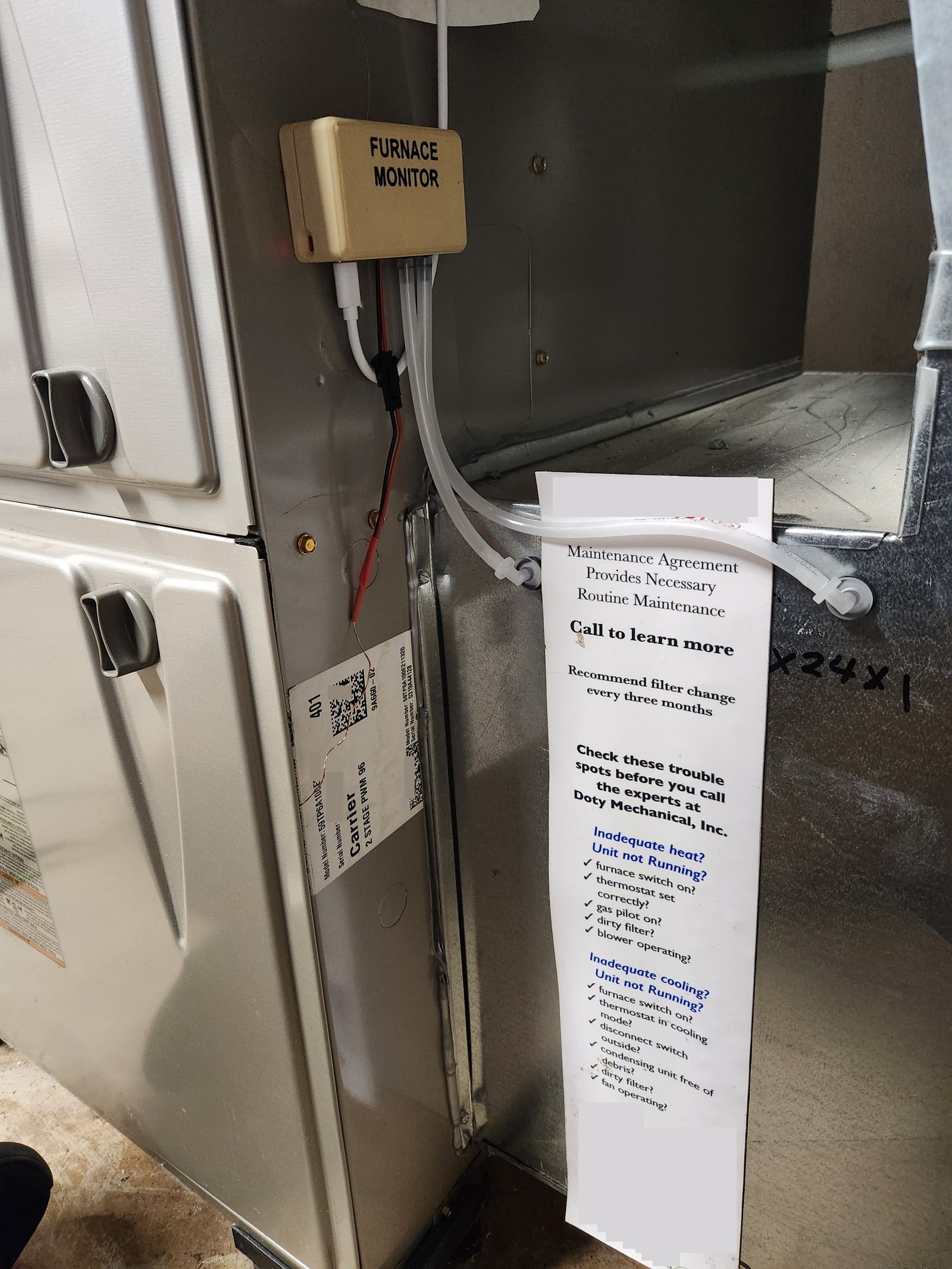
| Pressure sensor | Sensirion SDP810-500Pa | I²C, address 0x25, SDA GPIO16 / SCL GPIO17. Differential-pressure mode, read every 2 s. Factory-calibrated and temperature-compensated. |
| Status-LED sensor | CdS photoresistor | Voltage divider: 3V3 → CdS → GPIO34, 10 kΩ to GND. Sampled every 50 ms. |
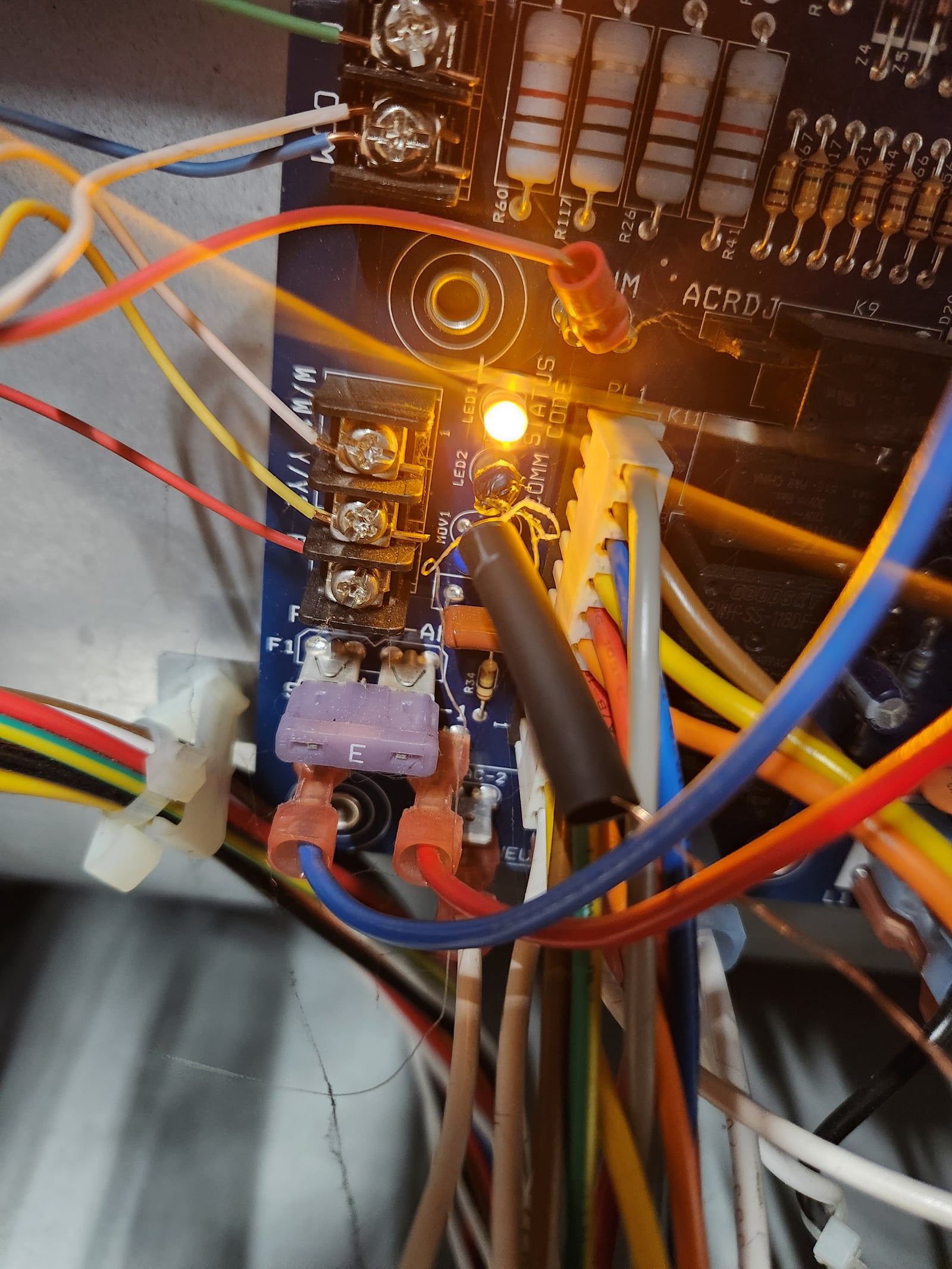
| Furnace control board | Carrier CEPL131102 | The CdS cell is hot-glued directly to the control board’s Error Code LED and covered by a slide-on, opaque length of heat-shrink tubing over the LED and the CdS, blocking ambient light so it only sees that one LED, not both. |
| Thermostat | Honeywell/Resideo T6 Pro | HomeKit-connected. Reports only heating / cooling / idle via hvac_action, with no fan speed or fan mode. |
Protoboard build, no schematic or PCB.
An earlier revision of the config ran I²C on GPIO21/22. Those pins were later retired as electrically damaged, which is why the sensor now sits on GPIO16/17.
The CdS leaves the control board compartment on a red/black wire pair. A quick-disconnect splice there steps down to a pair of much thinner wires, which is what actually passes through the seal of the furnace’s maintenance door to reach the ESP32.
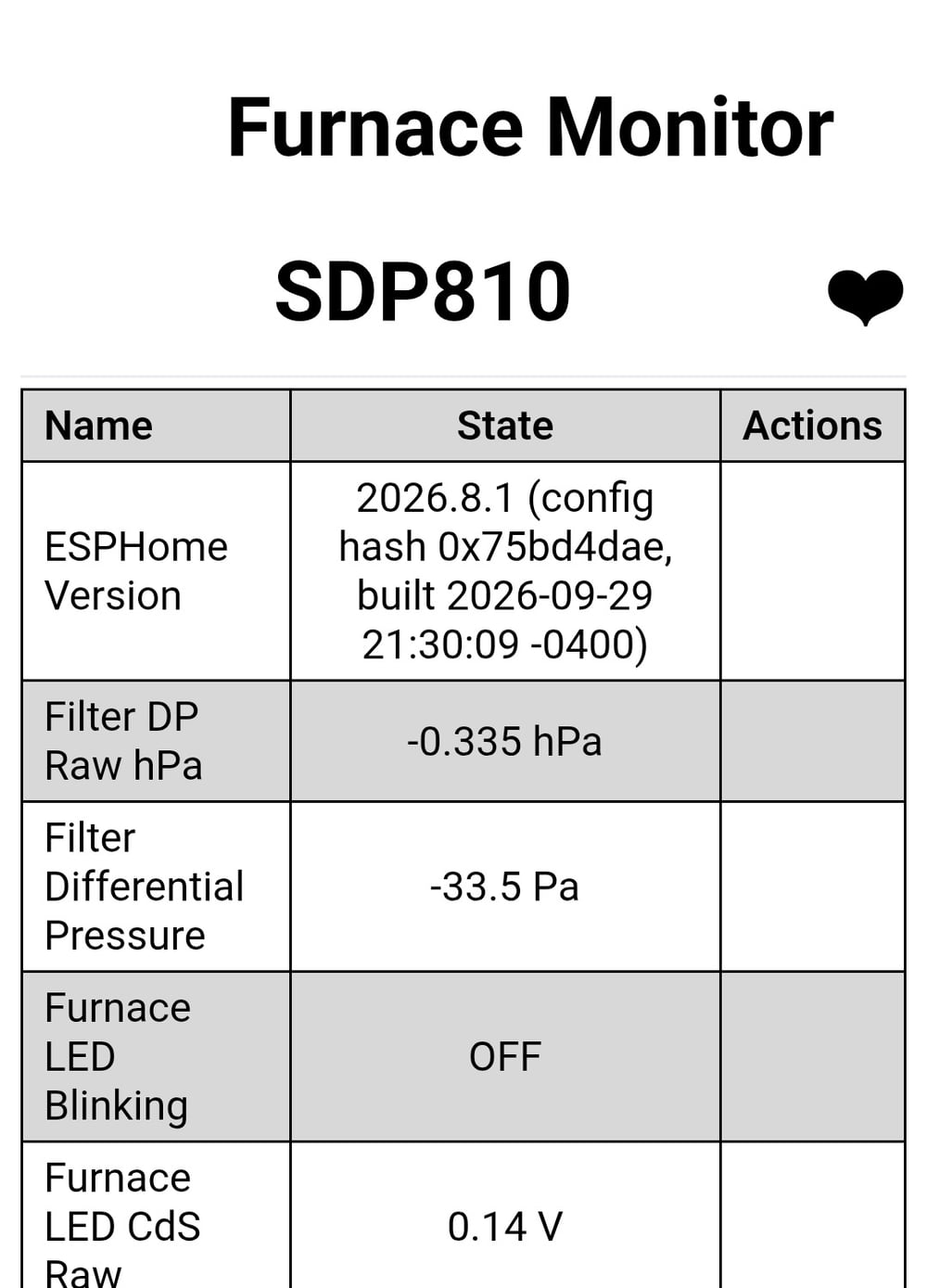
ESPHome’s built-in web server shows the live readings. IP and MAC address are cropped out below, same privacy treatment as the rest of the site:
Why the pressure sensor changed: MPX10DP → SDP810
The first version of this monitor used an MPX10DP analog differential bridge sensor, read through an HX711 24-bit ADC. That combination needed a stored zero offset, an SHT40 to measure the sensor’s own body temperature, and a temperature-coefficient correction to keep the zero point from drifting with ambient temperature — and getting that correction right meant calibrating the sensor at multiple temperatures and pressures, work that’s simply not needed with the SDP810. That’s a lot of plumbing just to get a trustworthy number. The SDP810 replaced all of it: it’s a digital, factory-calibrated, temperature-compensated sensor that reports differential pressure directly over I²C. The zero-offset storage, the body-temperature sensor, the drift correction, and the multi-point calibration all went away at once. The MPX10DP version is kept archived rather than deleted, in case the SDP810 ever needs comparing against it.
On the firmware side, the SDP810’s native hPa reading comes out of the sensor with the sign flipped (see Subtle features), then runs through a 5-sample median filter followed by an EMA (α = 0.2) before being exposed in Pa (×100 from hPa), alongside a diagnostic raw-hPa value for troubleshooting.
Reading the blower from the pressure
With a clean filter installed, the differential pressure settles into three distinct, repeatable levels:
| Blower state | Clean-filter pressure | Notes |
|---|---|---|
| Off | ~0 Pa | |
| Low (continuous circulate) | 35.1 Pa (0.14 in. w.c.) | The thermostat’s fan is set to “On”, so this is the idle norm, not an edge case |
| High (heating) | 87.4 Pa (0.35 in. w.c.) | Matches every thermostat heat call exactly; a brief dip to ~1 Pa at the start of each call is the furnace pausing the blower while the burner lights |
Pressure alone can’t say which speed the blower is running at. A clogged
filter raises the pressure at every speed, so a fixed Pa cutoff misclassifies
speed as the filter loads. Blower speed instead comes
from the thermostat: heating or cooling in hvac_action means high
speed, anything else means low. Pressure is only used to detect “blower off”
(below 5 Pa). To avoid catching the furnace’s pause-at-ignition dip and the
blower’s run-on after a heat call ends, a reading is only trusted once the
inferred speed has held steady for 180 s (low) or 120 s (high).
Filter loading and the alert
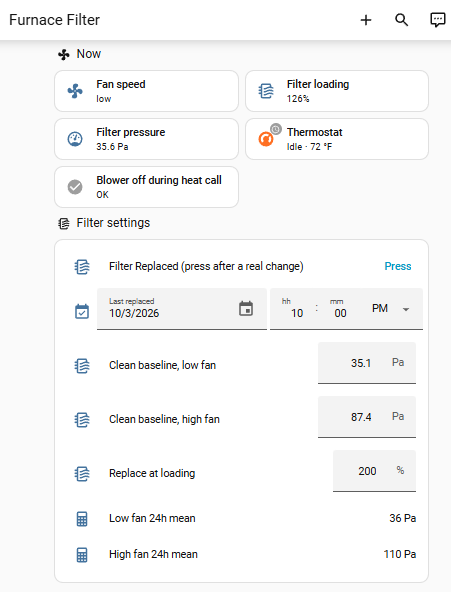
Each speed gets its own 24-hour rolling mean, and loading is computed as a ratio against a clean-filter baseline for that same speed, taken as a percentage. The higher of the two speeds’ ratios is used as the overall loading figure, since a clogged filter typically shows up more clearly at high flow.
The whole thing is built from Home Assistant UI helpers; there’s no YAML repo for this layer:
| Entity | Type | Logic |
|---|---|---|
| Furnace Fan Speed | template sensor | off if pressure < 5 Pa, else high if thermostat is heating/cooling, else low |
| Filter DP Low Fan / High Fan | template sensors | Hold the last pressure reading once speed has been steady (180 s / 120 s) |
| …24h Mean (×2) | statistics helpers | 24-hour mean of each speed’s held reading |
| Furnace Filter Loading | template sensor | 24h mean ÷ clean baseline, as a %, higher of the two speeds |
| Blower Off During Heat Call | template binary sensor | Heat call active for more than 5 min with pressure below 5 Pa. No airflow during a heat call means the heat exchanger is overheating, which trips the control board’s own high-limit switch and shuts the furnace down — a safe outcome for the equipment, but one that leaves the house cold. Currently heat-only — see Not done yet |
| Baseline Low / High, Replace Threshold | input_number | Clean-filter reference values, plus the 200% alert threshold |
| Filter Replaced | input_button + input_datetime | Pressed after a filter change; timestamps the swap |
Automations:
- Record Replacement stores the replacement date when the button is pressed.
- Capture Baseline runs at 3 AM, 24–48 h after a replacement, and copies the current 24h means into the clean baselines.
- Replace Alert sends a phone notification when loading stays above threshold for 2 h, plus a daily 6 PM reminder. It’s suppressed for 24 h after a replacement so the old filter’s data still sitting in the 24h buffer can’t trigger a false alert.
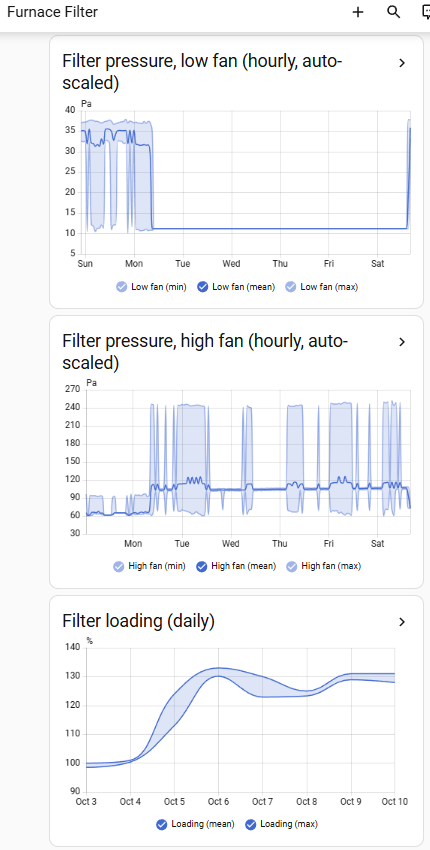
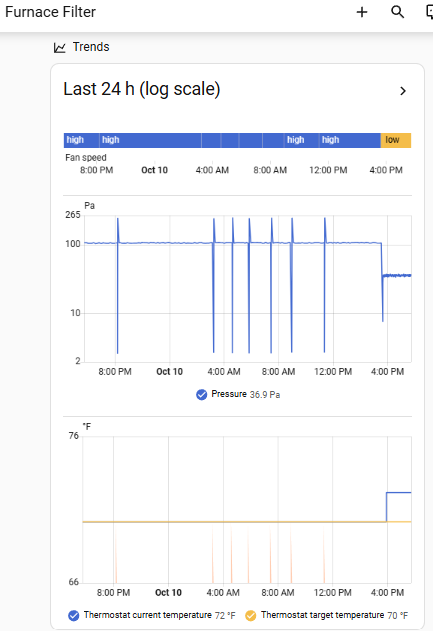
A dedicated Furnace dashboard shows a log-scale 24-hour pressure graph (off/low/high plotted together), per-speed hourly graphs that auto-scale so small drifts are visible, and a daily loading trend.
Core logic, generalized to readable entity names:
{# Furnace Fan Speed #}
{% set p = states('sensor.furnace_differential_pressure') | float(0) %}
{% set a = state_attr('climate.furnace_thermostat', 'hvac_action') %}
{{ 'off' if p < 5 else ('high' if a in ['heating', 'cooling'] else 'low') }}

{# Filter DP Low Fan: hold the last steady reading #}
{% set f = states.sensor.furnace_fan_speed %}
{% set p = states('sensor.furnace_differential_pressure') | float(none) %}
{% if f is not none and f.state == 'low' and p is not none
      and (now() - f.last_changed).total_seconds() > 180 %}{{ p | round(1) }}
{% else %}{{ this.state if this.state | is_number else none }}{% endif %}
Testing and validation
The old-filter experiment
The goal was to calibrate a “replace now” threshold from measured data instead of a guessed limit:
- A clean filter goes in Oct 3–5, with a baseline captured automatically 24 h after install.
- An old, used filter is swapped in from Oct 5–10.
- The good filter goes back in on Oct 10, and the fan-speed logic switches to reading the thermostat.
- An automatic baseline recapture runs Oct 12 at 3 AM, locking in the corrected numbers on the fixed logic.
| Blower | Clean | Old filter | Ratio |
|---|---|---|---|
| Low (circulate) | 35.1 Pa | ~104 Pa | ~3× |
| High (heating) | 87.4 Pa (mean) | ~244 Pa (peak) | ~2.5–2.8× |
Comparing like-for-like (clean high-speed peaks of ~95–99 Pa against the old filter’s high-speed peak of 244 Pa) lands at about 2.5×. The high/low pressure ratio stays roughly 2.4–2.5× with either filter installed, which means the blower’s speed ratio is a stable property independent of filter condition. That stability is why speed detection relies on the thermostat instead of pressure. The swap back to the clean filter shows up as a step from 106 Pa to 36 Pa within a single 5-minute window.
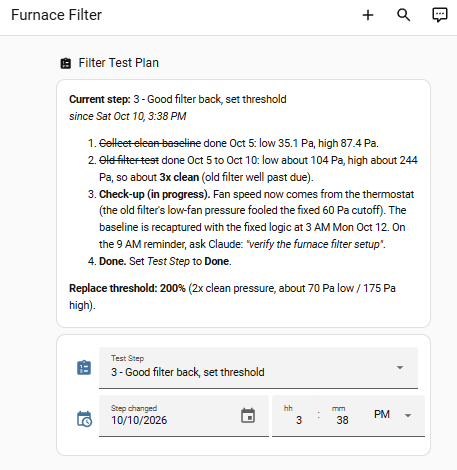
Replacement threshold: 200% of clean. That’s twice the clean-filter pressure (about 70 Pa at low speed, 175 Pa at high), the common “replace at 2× clean ΔP” rule. The old filter, at roughly 3×, was well past due.
The dashboard’s own pressure and loading history show the whole cycle: the climb when the old filter went in, the plateau while it stayed in, and the fan-speed color bar across the log-scale pressure graph that makes the ignition-pause dips and the low/high split easy to read at a glance.
The cycle is tracked live in a Home Assistant helper rather than just in memory, which helps for a multi-day test with automated steps in the middle. As of this writing it’s on the last step, waiting on the Oct 12 baseline recapture to close it out:
Subtle features
A few details that don’t fall out of the config at a glance:
- Sign flip. Which tubing run landed on which of the sensor’s two ports
was arbitrary, and the pair that got connected happened to read a loading
filter as negative pressure.
multiply: -1in firmware corrects it going forward; the already-recorded history was corrected in the database. - Baseline-deviation detection, not a fixed threshold. LED1 on the control board is steady-on during normal operation, so a fixed brightness cutoff can’t tell “normal” from “blinking.” Instead the firmware tracks a slow EMA baseline (α = 0.01, ~5 s time constant) and fires a binary sensor when the raw reading deviates more than 0.15 V from it.
- Log-scale graphing. On a linear axis, the low-speed plateau and its drift get squashed against the high-speed peaks. A log-scale axis spaces off/low/high evenly so drift at any speed is visible.
- Per-speed normalization. Loading is a ratio to each speed’s own clean baseline. That’s what makes it possible to compare low-speed and high-speed loading on a single percentage scale.
- The psi gotcha. HA’s
pressuredevice class on a US-units install silently displays in psi. 35 Pa shows as 0.005 psi and rounds to 0 on most dashboards, so a unit override to Pa was required to make any of this readable.
Not done yet
- Blink-code decoding. The CdS baseline-deviation detector reports that the LED is blinking, but not the actual Carrier fault code. That decoding isn’t implemented, and the 0.15 V deviation threshold hasn’t been tuned or validated against a known blink code yet.
- A cooling-season data set. All the pressure figures above, including the high-speed baseline, are from heating calls. The AC runs the blower at a different speed than a heat call does, so that baseline doesn’t actually apply to cooling — AC will need its own calibration pass once there’s a cooling season to run it in.
- A second filter-life cycle, to confirm the 200% threshold holds up over more than one replacement interval.
- No-airflow check during AC calls. The blower-off safety check only watches heat calls right now. The failure mode on the cooling side is different — no airflow during a cooling call lets the evaporator coil ice over instead of tripping a high-limit switch — but it’s just as worth catching, and isn’t yet.
Getting it
This project’s ESPHome config isn’t published yet. It currently lives alongside other devices’ network and secrets configuration in a private repo. A cleaned, public-safe copy is planned, and this page will link to it once that’s ready. In the meantime, the hardware table, sensor facts, and Jinja templates above are enough to reproduce the design.